WebMCP Explained: Let AI Agents Call Your Website Instead of Clicking It
WebMCP lets a web page give AI agents typed tools through document.modelContext, so they call functions instead of guessing from screenshots. Real examples tested in Chrome 156: the JavaScript and HTML form APIs, React, security, and what changed in 2026.
siddaram metri · · 17 min read · 3 views
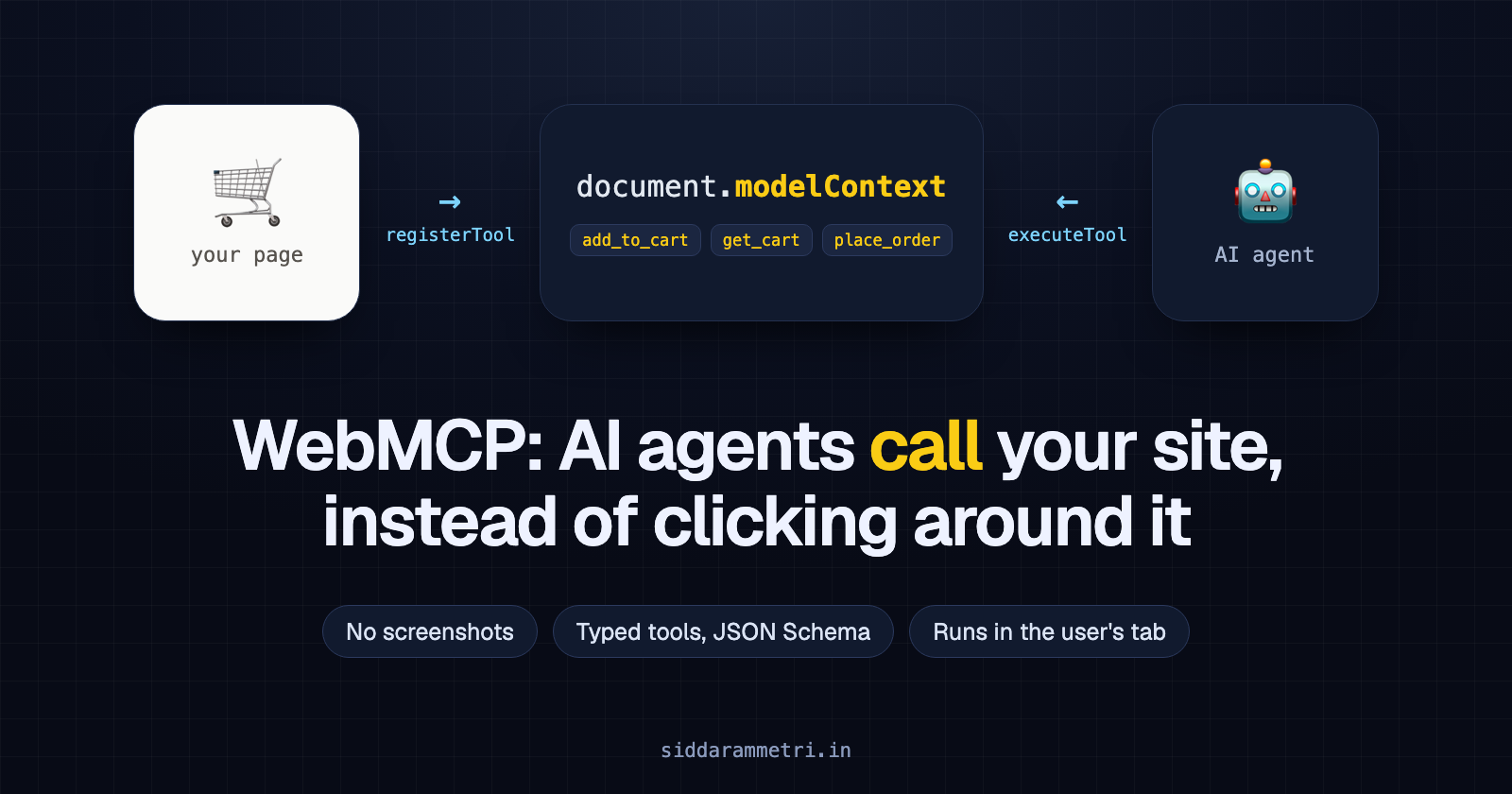
When an AI agent uses a website today, it acts like a very patient intern: take a screenshot, guess which button is the right one, click, take another screenshot, repeat. It's slow, and it breaks as soon as the layout changes.
WebMCP lets a page tell the agent what it can do: "I have a tool called add_to_cart. It takes a drink and a quantity." The agent calls that function directly, and the page runs its own code.

Same request, two approaches. Left: guessing at pixels. Right: one typed function call.
This post is mostly examples. Everything here was tested in Chrome 156 with WebMCP turned on, and the GIFs are recordings of real tool calls.
The whole idea in one snippet
await document.modelContext.registerTool({
  name: 'add_to_cart',
  description: 'Add a drink from the menu to the current order.',
  inputSchema: {
    type: 'object',
    properties: {
      drink: { type: 'string', enum: ['latte', 'cappuccino', 'cold-brew'] },
      quantity: { type: 'integer', minimum: 1, maximum: 10 },
    },
    required: ['drink', 'quantity'],
  },
  execute: async ({ drink, quantity }) => {
    addToCart(drink, quantity);            // the same function your "Add" button calls
    return `Added ${quantity} × ${drink}.`; // what the agent reads back
  },
});
That's the whole idea. A tool has four parts:
| Part | What it's for | In the example |
|---|---|---|
name | What the agent calls | add_to_cart |
description | Tells the model when to use it | "Add a drink…" |
inputSchema | A JSON Schema for the arguments | drink, quantity |
execute | Your code. It runs in the page, with the user's session and UI | calls addToCart() |
How it works

- Register: your page calls
document.modelContext.registerTool(). - Discover: the agent (a browser assistant or an extension) asks the browser which tools the page has, and reads their names, descriptions and schemas.
- Call: the agent picks a tool and sends arguments. The browser runs your
execute()inside the tab. - Result: your UI updates as normal, and the string you return goes back to the agent.
Compared with a normal (backend) MCP server:
| MCP server | WebMCP | |
|---|---|---|
| Where tools run | On a server you host | In the user's open browser tab |
| Logged-in state | You build auth (OAuth, API keys) | Uses the session the user already has |
| UI | None; the agent works blind | Your real UI updates, so the user can watch |
| Lifetime | Always on | Exists only while the page is open |
| Written in | Any language, using an MCP SDK | Plain JavaScript or HTML on your site |
WebMCP borrows MCP's ideas (tools, schemas) but isn't the MCP wire protocol. The explainer says it's meant to complement backend MCP, not replace it.
Status (October 2026): what's true now
Many WebMCP articles are already out of date. Here's what I checked against the spec, Chrome's docs and a real browser:
| Claim you'll see | Current state |
|---|---|
| "A W3C standard" | It's a Draft Community Group Report from the W3C Web Machine Learning Community Group, edited by engineers from Google and Microsoft. It is not a W3C Standard and not on the Standards Track yet. |
navigator.modelContext | Moved to document.modelContext. In Chrome 156, navigator.modelContext is undefined. |
provideContext() / clearContext() | Removed from the spec. Use registerTool() once per tool, and an AbortSignal to remove it. |
| "Chrome 146, behind a flag" | That was the early preview. Chrome now has a public origin trial starting in Chrome 149 (Chrome docs), and the flag still works for local testing. |
| Other browsers | Edge has an origin trial from Edge 150. Firefox and Safari have no implementation yet (see the implementation status). |
It's experimental. Names and details can still change. Treat it as progressive enhancement: your site must work without it.
Try it yourself in 2 minutes
- Open
chrome://flags/#enable-webmcp-testing, set it to Enabled and relaunch Chrome. - Open any page served over HTTPS or
localhost. WebMCP only works in secure contexts. - Open DevTools → Console and paste:
await document.modelContext.registerTool({
  name: 'say_hello',
  description: 'Greet someone by name',
  inputSchema: { type: 'object', properties: { name: { type: 'string' } }, required: ['name'] },
  execute: async ({ name }) => `Hello, ${name}!`,
});

// Now play the agent: list the tools and call one.
const [tool] = await document.modelContext.getTools();
await document.modelContext.executeTool(tool, { name: 'Siddaram' });
// → 'Hello, Siddaram!'
getTools() and executeTool() are the agent's side of the API. Calling them yourself is the quickest way to test your tools without an AI model.
To try it with a real model, Chrome links two testing extensions in its WebMCP docs: the Model Context Tool Inspector (lists and runs a page's tools, with a Gemini API key) and an example agent extension.
Example 1: the imperative API (JavaScript)
A small coffee shop page with three tools. The panel on the right logs each real tool call:

Recorded in Chrome 156. The page shows a confirmation, and nothing is ordered until the person clicks Confirm.
👉 Open the live demo (with the flag on, the badge turns green).
The three tools, simplified from the demo's source:
// 1. Changes the cart. The schema says what's allowed; the code double-checks.
await document.modelContext.registerTool({
  name: 'add_to_cart',
  description: 'Add a drink from the Byte Brew menu to the current order.',
  inputSchema: {
    type: 'object',
    properties: {
      drink: { type: 'string', enum: ['latte', 'cappuccino', 'cold-brew', 'masala-chai'] },
      size: { type: 'string', enum: ['small', 'medium', 'large'], description: 'Cup size, medium by default' },
      milk: { type: 'string', enum: ['dairy', 'oat', 'almond', 'none'] },
      quantity: { type: 'integer', minimum: 1, maximum: 10 },
    },
    required: ['drink', 'quantity'],
  },
  execute: async ({ drink, size = 'medium', milk = 'dairy', quantity }) => {
    if (!MENU[drink]) return `"${drink}" isn't on the menu. Choose one of: ${Object.keys(MENU).join(', ')}.`;
    addToCart({ drink, size, milk, quantity });
    return `Added ${quantity} × ${size} ${MENU[drink].name} (${milk} milk). Cart total: ₹${cartTotal()}.`;
  },
});

// 2. Only reads data, so mark it read-only.
await document.modelContext.registerTool({
  name: 'get_cart',
  description: 'List the drinks in the current order and the total in rupees.',
  inputSchema: { type: 'object', properties: {} },
  annotations: { readOnlyHint: true },
  execute: async () => JSON.stringify({ items: cart, total: cartTotal() }),
});

// 3. Spends money, so mark it consequential and ask the human first.
await document.modelContext.registerTool({
  name: 'place_order',
  description: 'Place the current order for pickup. The person on the page confirms it first.',
  inputSchema: { type: 'object', properties: {} },
  annotations: { consequentialHint: true },
  execute: async () => {
    const confirmed = await askUserToConfirm(); // shows the yellow bar, waits for a click
    if (!confirmed) return 'The user cancelled the order. Nothing was charged.';
    const id = await submitOrder();
    return `Order ${id} placed. Ready for pickup in 8 minutes.`;
  },
});
Three habits to copy from this:
executereuses app code.addToCart()is the same function the Add button calls, so the UI stays in sync.- Errors are returned as text. "mocha isn't on the menu, choose one of…" lets the model fix its call and try again.
- A human approves anything risky.
executecanawaityour own confirmation UI.
Annotations: hints for the agent
| Annotation | Set it when | Example |
|---|---|---|
readOnlyHint: true | The tool only reads | get_cart, search_products |
consequentialHint: true | The action is significant or can't be undone | place_order, delete_account |
untrustedContentHint: true | The result contains text you don't control | user reviews, comments, fetched web pages |
debugging: true (Chrome 156+) | The tool is only for developer tools | dump_state |
They're hints: the spec says agents shouldn't trust them for security. Your execute still has to enforce your rules.
Example 2: the declarative API (just HTML)
Already have a form? Three attributes turn it into a tool, with no JavaScript:
<form toolname="reserve_table"
      tooldescription="Reserve a table at Masala Lab for a date, time and number of guests.">
  <label>Name for the booking <input name="name" required></label>
  <label>Date <input type="date" name="date" required></label>
  <label>Time
    <select name="time" required>
      <option value="19:00">7:00 pm</option>
      <option value="20:00">8:00 pm</option>
    </select>
  </label>
  <label>Guests
    <input type="number" name="guests" min="1" max="8" required
           toolparamdescription="Number of people, from 1 to 8">
  </label>
  <button type="submit">Reserve</button>
</form>

The agent fills the form, but the person presses Reserve. Without toolautosubmit, the tool call waits for that click.
Chrome builds the schema from your HTML. This is what getTools() returned for the demo (shortened):
{
  "name": "reserve_table",
  "inputSchema": {
    "type": "object",
    "properties": {
      "name":   { "type": "string", "description": "Name for the booking" },
      "date":   { "type": "string", "format": "date",
                  "description": "Date (Dates MUST be provided in 'YYYY-MM-DD' format.)" },
      "time":   { "type": "string", "enum": ["19:00", "20:00"],
                  "anyOf": [{ "const": "19:00", "title": "7:00 pm" }, { "const": "20:00", "title": "8:00 pm" }] },
      "guests": { "type": "number", "minimum": 1, "maximum": 8, "multipleOf": 1,
                  "description": "Number of people, from 1 to 8" }
    },
    "required": ["name", "date", "time", "guests"]
  }
}
| HTML you write | What the agent gets |
|---|---|
<label> text | The parameter's description |
toolparamdescription="…" | A description that replaces the label |
type="date" | format: "date" plus a "YYYY-MM-DD" hint |
<select> + <option>s | An enum, with each option's text as its title |
type="number" min max | minimum, maximum, multipleOf: 1 |
required | Added to the required list |
Send a result back, and style the "agent is here" state
form.addEventListener('submit', (event) => {
  event.preventDefault(); // required before respondWith()
  const booking = Object.fromEntries(new FormData(form));
  showConfirmation(booking);

  if (event.agentInvoked) {
    event.respondWith(Promise.resolve(`Booked a table for ${booking.guests} on ${booking.date}.`));
  }
});
/* While the agent has filled the form and is waiting for the user */
form:tool-form-active { box-shadow: 0 0 0 4px #fde68a; }
button:tool-submit-active { box-shadow: 0 0 0 4px #fde68a; }
| Attribute or API | What it does |
|---|---|
toolname, tooldescription | Turn the form into a tool (remove either one and the tool disappears) |
toolparamdescription | Describe one field for the model |
toolautosubmit | Let the agent submit by itself (leave it off for bookings and payments) |
event.agentInvoked | true when an agent submitted the form |
event.respondWith(promise) | Its value becomes the tool's result |
toolactivated / toolcancel events | Fire on document.modelContext when an agent fills the form, or the call is cancelled |
Example 3: React, without leaks
Tools should exist only while the component that owns them is on screen. Register in an effect and remove the tool in the cleanup with an AbortController:
function useWebMCPTool(tool) {
  useEffect(() => {
    if (!('modelContext' in document)) return; // other browsers: do nothing
    const controller = new AbortController();
    document.modelContext
      .registerTool(tool, { signal: controller.signal })
      .catch((error) => { if (error.name !== 'AbortError') console.error(error); });
    return () => controller.abort(); // unregisters the tool
  }, [tool]);
}

// usage
const addTodoTool = useMemo(() => ({
  name: 'add_todo',
  description: "Add an item to the user's todo list.",
  inputSchema: { type: 'object', properties: { text: { type: 'string' } }, required: ['text'] },
  execute: async ({ text }) => { addTodo(text); return `Added "${text}".`; },
}), [addTodo]);

useWebMCPTool(addTodoTool);
Why the .catch: React Strict Mode mounts, unmounts and mounts again. I tested that sequence in Chrome: re-registering the same name works, but the first registerTool() promise rejects with AbortError because it was aborted before it finished. Without the catch, that shows up as an unhandled rejection.
For TypeScript types, Chrome's docs point to the webmcp-types package.
What I found testing in Chrome 156
These details are easy to miss in the docs, so I checked each one in Chrome 156:
| You do this | Chrome does this | So… |
|---|---|---|
Return an object from execute | The agent gets it as a JSON string | Return a string, written for the model |
throw new Error('Out of stock') | The caller gets UnknownError: Tool was executed but the invocation failed. Your message is lost | Return errors as text instead of throwing |
Leave out a required argument | execute still runs, with undefined | Validate in code; the schema is only a guide |
| Register the same name twice | InvalidStateError: Duplicate tool name | One name per tool per page |
controller.abort() | The tool disappears from getTools() and toolchange fires | Use it for page-specific tools |
Use navigator.modelContext | undefined | Use document.modelContext |
Security: the short version
The agent acts as the user, with their cookies and session, so be careful with what you expose.
- Confirm consequential actions in your own UI (like
place_orderabove), and setconsequentialHint: true. - Mark untrusted output. If a tool returns reviews, comments or emails, set
untrustedContentHint: true. That text could contain a prompt injection ("ignore previous instructions…"). - Describe tools honestly. A tool called
finalizeCartthat actually buys the cart is the spec's own example of "misrepresentation of intent". - Ask only for what you need. Don't make a tool take a phone number or address it doesn't use.
- Iframes are off by default. The
toolsPermissions Policy allows only same-origin documents. A cross-origin iframe needsallow="tools", the tool needsexposedTo: ['https://parent.example'], and the caller needsgetTools({ fromOrigins: [...] }).
Writing tools that agents use well
| ❌ Avoid | ✅ Prefer | Why |
|---|---|---|
name: 'process' | name: 'create_event' | The verb says exactly what happens |
'Do not use for weather' | 'Create a calendar event for a date and time' | Say what the tool does |
shippingId: 3 | shipping: 'express' | The model sees meaningful values |
Asking the model for durationMinutes | Accepting start and end as the user said them | Your code does the maths |
| 40 overlapping tools | A few focused tools for the current page | Each tool uses context and adds chances to pick the wrong one |
These follow Chrome's WebMCP best practices, plus one more: update the UI first, then return. The user should see the cart change at the moment the agent says "done".
Add it to your own site
Feature detection keeps it safe everywhere:
if ('modelContext' in document) {
  registerMyTools(); // Chrome or Edge with WebMCP on
}
// Everyone else: the site works exactly as before.
To ship it to real users without the flag, register your site for the origin trial and add the token. Or let Claude Code do the first pass: click Copy Claude Code prompt (in the right-hand sidebar, or under the title on mobile) and paste it into Claude Code inside your project. It lists candidate tools, waits for you to choose, and shows the diff before writing anything.
This blog is WebMCP-ready too
I added tools to this site using the same patterns as above. With WebMCP on, open DevTools on any page here and run:
const tools = await document.modelContext.getTools()
tools.map((t) => t.name)
// home page: ['fill_contact_form', 'get_profile', 'list_projects', 'open_page', 'search_posts']

const search = tools.find((t) => t.name === 'search_posts')
await document.modelContext.executeTool(search, { query: 'Claude Code' })
// '{"count":1,"posts":[{"title":"Claude Code Status Line: …","url":"…"}]}'
| Tool | Where | What it does |
|---|---|---|
search_posts | Every page | Searches the blog by topic or tag (read-only) |
list_projects | Every page | My projects, with stack and links (read-only) |
get_profile | Every page | Role, skills, links and résumé (read-only) |
open_page | Every page | Opens a post, project or page in this tab |
fill_contact_form | Home page | Fills the contact form; you press Send |
fill_newsletter_signup | Pages with the sign-up box | Fills in your email; you press Subscribe |
Two choices worth copying:
- Tools follow the page.
fill_contact_formexists only where the contact form is, and nothing is registered in the admin area. - Forms are filled, never sent. Both forms are React-controlled and have a hidden anti-spam field, so the declarative attributes don't fit. Instead, a small JavaScript tool fills them through the form library, highlights the form, and leaves the final click to the person.
FAQ
Is WebMCP the same as MCP? No. It uses MCP's ideas (tools with names, descriptions and JSON Schema), but tools are registered in the page through a browser API. A backend MCP server is still the right choice for agents that work without a browser.
Do I need a server or an AI model? No. You only register functions. The agent (and its model) belongs to the browser or extension the user chooses.
Which agents can call these tools today? It's early. The project's implementation status lists Chrome and Edge origin trials, ChatGPT Desktop as supported, experimental support in Brave's Leo, and Meta Ray-Ban Display as coming soon. Chrome extensions can also call tools from content scripts, and Chrome's testing extensions let you try your tools with a real model.
Does it work in Firefox or Safari? Not yet. With feature detection, those users simply get your normal site.
Can an agent call tools on a page that isn't open? No. Tools exist only while the page is open in a tab. Discovering tools in the background (for example through service workers) is still being explored.
Is it safe to add now? The API is experimental and may change, so keep it behind feature detection, start with read-only tools, and require a confirmation for anything consequential.
Wrap-up
- WebMCP lets a page expose typed functions to AI agents:
document.modelContext.registerTool({ name, description, inputSchema, execute }). - No JavaScript? Add
toolnameandtooldescriptionto a<form>. - Tools run in the user's tab: the same session, the same UI and the same code as your buttons.
- It's a draft from a W3C Community Group with origin trials in Chrome 149+ and Edge 150+. Use it as progressive enhancement.
Read more: the WebMCP spec, the explainer on GitHub, and Chrome's guides for the imperative and declarative APIs. Both demos from this post (coffee shop, table booking) are single HTML files: view the source and copy what you need. More posts are on the blog.
Get new posts by email
One email when I publish something new. No spam, and you can unsubscribe in one click.